
Ecommerce Automation: The Complete Guide for Growing Online Stores
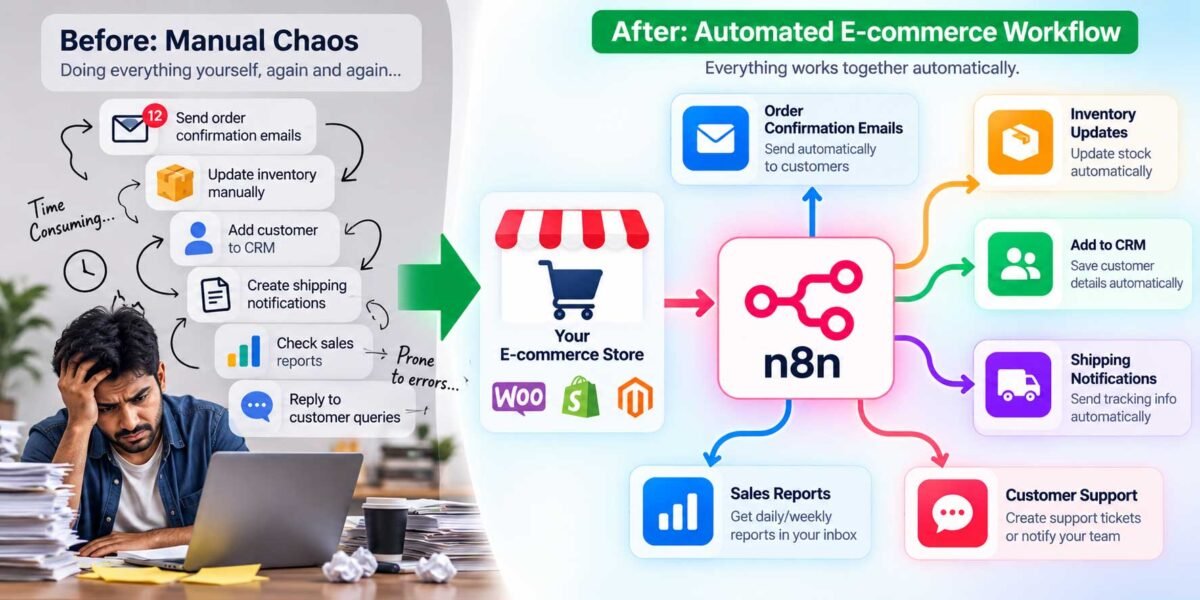
Run an online store long enough, and you hit the same wall every single time: the tasks that felt manageable at 10 orders a day become genuinely unsustainable at 100. Suddenly you’re the one manually sending shipping updates, chasing abandoned carts, updating inventory across three different places, and wondering why you started a business to become a full-time data-entry clerk.
Ecommerce automation is how you get off that treadmill. I’ve spent years building these systems specifically for WooCommerce stores, and I want to walk you through what ecommerce automation actually is, what’s realistically worth automating first, and how to think about building this out without getting overwhelmed by the hundred different tools claiming to solve it.
What Is Ecommerce Automation?
Ecommerce automation is the use of software and workflows to handle the repetitive, rule-based tasks that keep an online store running — order processing, customer communication, inventory management, marketing follow-ups — without a human doing each one manually, every time. Instead of you (or your team) repeating the same actions for every order, a set of rules and triggers does it for you, instantly and consistently, whether it’s 2pm on a Tuesday or 3am on a Sunday.
The key word here is repetitive. Automation isn’t about replacing the judgment calls that genuinely need a human — it’s about removing the parts of running a store that don’t need a decision made each time, just the same correct action taken.
Why It Matters More at Every Stage of Growth
A lot of people assume automation is something you “graduate into” once you’re a big store. In my experience, that’s backwards — automation matters most when you’re small, because that’s when you have the least spare capacity to absorb manual work. A one-person store drowning in order confirmations and support emails needs automation more urgently than a company with a twenty-person fulfillment team.
Here’s what it actually buys you at any size:
- You stop losing sales to slow response times. A cart abandonment email that fires an hour after someone leaves recovers sales that a same-day manual follow-up never would.
- Errors go down. Manually re-typing shipping addresses or order totals is where mistakes creep in. Automated data flow doesn’t get tired at 6pm.
- You can grow order volume without growing headcount at the same rate. This is the one that actually changes the trajectory of a small business.
The Core Areas Worth Automating
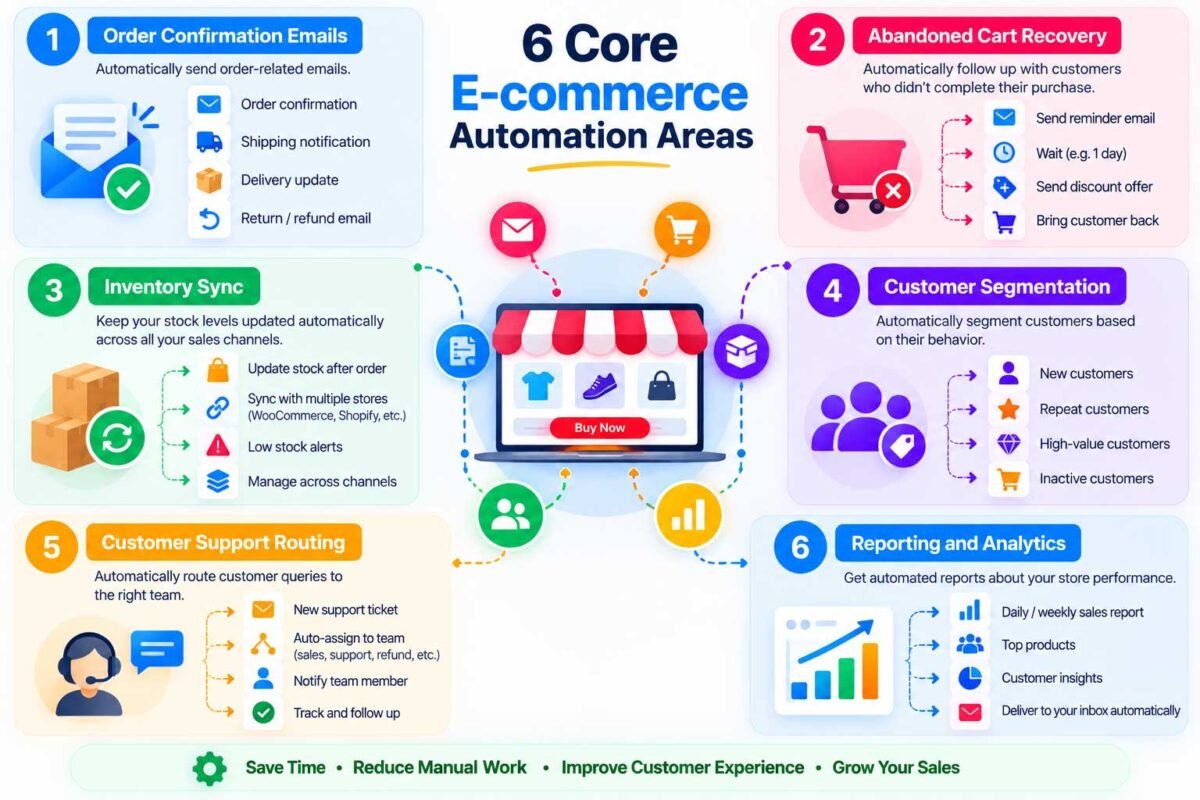
Let me walk through where I actually start when I’m building out automation for a new WooCommerce client, roughly in the order I’d tackle them.
1. Order Confirmation and Status Emails
This is the foundation — the moment someone buys, they should immediately get a clear, well-designed confirmation, and further updates as their order ships and arrives. WooCommerce handles the basics natively, but most stores I audit have this badly configured or barely customized. Getting this right alone eliminates a huge share of “did my order go through?” support tickets.
2. Abandoned Cart Recovery
Somewhere between 60-80% of online shopping carts get abandoned industry-wide, and most of those customers never come back on their own. An automated recovery sequence — a reminder email an hour later, maybe a small incentive after a day — recovers a meaningful slice of sales that would otherwise just vanish. This is consistently one of the highest-ROI automations I build, because it’s recovering revenue that was already almost yours.
3. Inventory and Stock Sync
If you sell across multiple channels (your website, a marketplace, a physical location), manually keeping stock counts accurate everywhere is a losing battle — you will eventually oversell something. Automated inventory sync updates every connected channel the moment a sale happens anywhere, so you stop apologizing to customers for orders you can’t actually fulfill.
4. Customer Segmentation and Follow-Up
Not every customer should get the same email. Automation lets you split customers automatically — first-time buyers, repeat customers, high-value spenders — and send each group something relevant, like a welcome discount for new customers or an early-access offer for your best ones, without manually sorting a customer list every time you want to run a campaign.
5. Support Ticket Routing
As order volume grows, so does your support inbox. Automatically routing tickets by topic (shipping question, refund request, product issue) to the right person means faster resolutions and fewer things sitting unanswered because they landed in the wrong inbox.
6. Reporting and Reordering Alerts
Pulling sales numbers together manually every week eats hours that could go toward actually running the business. Automated reports — and automated low-stock alerts that tell you what to reorder before you run out — keep you ahead of problems instead of reacting to them after a customer already noticed.
How the Pieces Actually Connect
Here’s where a lot of guides on this topic stay too abstract to be useful: ecommerce automation isn’t one tool, it’s usually a small stack working together. For a typical WooCommerce store, that often looks like:
- WooCommerce itself, handling the core store logic and native order emails
- A workflow automation tool like n8n, connecting your store to everything else — your CRM, your email platform, your inventory system, your support tool
- Specific plugins, handling store-specific tasks like backups, SEO, or advanced cart recovery sequences that go beyond WooCommerce’s defaults
The magic isn’t really in any single tool — it’s in connecting them so information flows automatically between them, instead of you being the manual bridge between four different dashboards.
Where to Start (Without Overwhelming Yourself)
If you’re reading this and thinking “I need all of this,” take a breath — nobody builds this all at once. Here’s the order I’d genuinely recommend:
- Fix your order confirmation emails first. It’s the fastest win and touches every single customer.
- Add abandoned cart recovery next. It directly recovers revenue, which tends to fund whatever automation work comes after it.
- Then tackle whichever pain point is loudest for you right now — inventory chaos, support overload, or reporting headaches. Let your actual daily frustration guide the order, not a generic checklist.
Final Thoughts
Ecommerce automation isn’t about building some futuristic, hands-off store that runs itself with zero human involvement — that’s not realistic, and honestly, it’s not even the goal. It’s about making sure the repetitive 80% of running a store happens correctly and instantly, so you and your team can spend your energy on the 20% that actually needs a human — product decisions, customer relationships, strategy. Get that balance right, and growth stops feeling like it’s actively working against you.
Want to see exactly what’s worth automating in your WooCommerce store first? Get in touch and I’ll audit your store and build out the automations that’ll actually move the needle — starting with whatever’s costing you the most time right now.