
“wc_legacy_cart:coupons_enabled” Error in WordPress: What It Means & How to Fix It
If you opened your WordPress site (or your error log) and saw something like wc_legacy_cart:coupons_enabled is deprecated since version 2.5 staring back at you, take a breath first — this looks scarier than it actually is. I’ve fixed this exact notice on client sites more than once, and in almost every case, the store itself is still working fine underneath it. Let’s walk through exactly what’s happening and how to clean it up properly.
What This Error Actually Means
This isn’t a crash, and it isn’t WooCommerce breaking. It’s a PHP deprecation notice — WordPress and WooCommerce’s way of flagging that some piece of code on your site is calling an old, outdated WooCommerce function instead of the current, recommended one.
Specifically, coupons_enabled used to be a method you’d call like a function — $cart->coupons_enabled() — back in older versions of WooCommerce. Since WooCommerce 2.5, that was replaced with a simpler property you just read directly — $cart->coupons_enabled (no parentheses). To avoid instantly breaking every older plugin and theme still using the old method, WooCommerce built a quiet backward-compatibility layer called WC_Legacy_Cart that catches these old-style calls, lets them keep working, and throws this deprecation notice to flag that something on your site needs updating.
So in plain terms: some plugin or theme on your site is using outdated WooCommerce code, and WooCommerce is politely telling you about it.
Why You’re Seeing It Now (Even If Nothing Changed)
This notice often shows up suddenly after a WooCommerce core update, a PHP version upgrade, or a theme/plugin update — not because something broke, but because newer versions of WooCommerce and PHP have gotten stricter about surfacing these deprecated calls instead of silently ignoring them. If you recently updated PHP (which, for what it’s worth, is generally a good security move — I cover why in my WordPress security checklist), that’s a very common trigger for this notice appearing for the first time.
Is It Actually Hurting Your Site?
Usually, no — it’s a notice, not a fatal error, and your cart and checkout will typically keep functioning normally underneath it. That said, it’s worth fixing properly rather than ignoring, for a few real reasons:
- If it’s displaying visibly on your site (not just in your error log), it looks unprofessional and can confuse or worry customers who see raw PHP warnings on your checkout page.
- It can indicate an outdated plugin or theme that may have other, more serious compatibility issues lurking that just haven’t surfaced yet.
- Accumulated deprecation notices can occasionally interfere with page output in edge cases, particularly if a notice fires before headers are sent, which can cause “headers already sent” warnings or broken redirects.
How to Actually Fix It
Step 1: Stop It From Displaying Publicly (Immediate Fix)
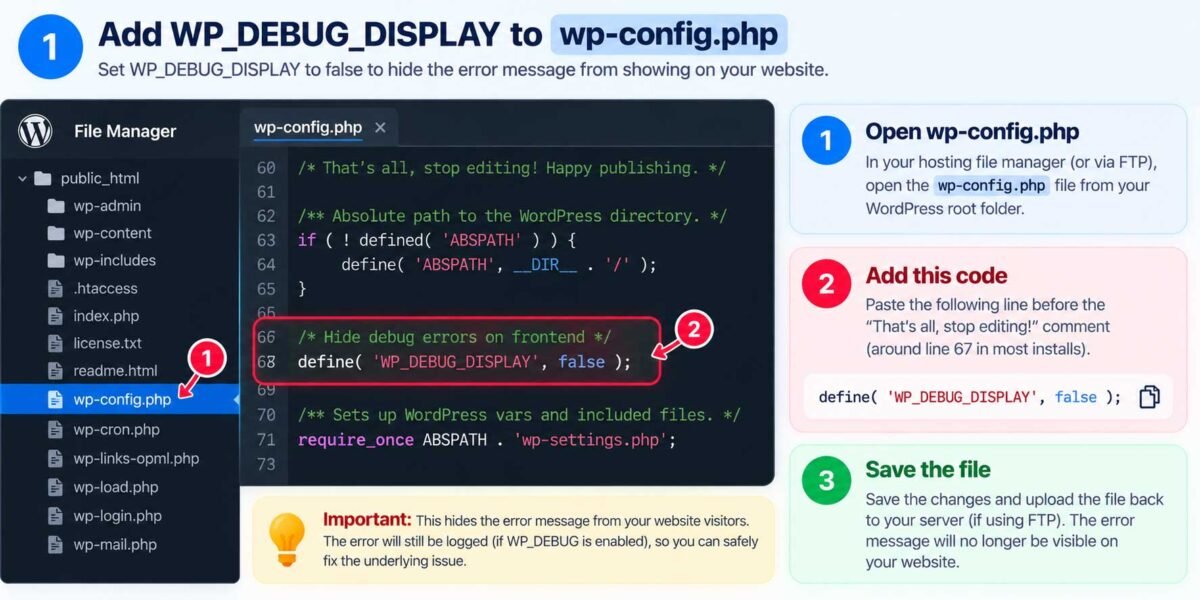
If this notice is visibly showing up on your live site, the first thing to do is stop it from displaying to visitors while you track down the real source. In your wp-config.php file, make sure you have:
define( 'WP_DEBUG', true );
define( 'WP_DEBUG_DISPLAY', false );
define( 'WP_DEBUG_LOG', true );
This logs the notice quietly to /wp-content/debug.log instead of printing it on-screen for every visitor, while still letting you (and me, if you bring someone in to fix it) see exactly what’s triggering it.
Step 2: Identify What’s Actually Calling the Old Code
Open that debug log and look at the full notice — it includes a file path and line number showing exactly which plugin or theme file made the outdated call. This is the key piece of information; without it, you’re guessing. Common sources of this specific notice are:
- An older, unmaintained WooCommerce extension or add-on plugin
- A theme (especially older or heavily customized ones) with custom cart/checkout code
- Custom code added to your site’s
functions.phpby a previous developer, written against an old WooCommerce version
Step 3: Update or Replace the Source
Once you’ve identified the plugin or theme, check if there’s a newer version available — most actively maintained plugins have already updated their code to use the modern coupons_enabled property instead of the deprecated method. A simple plugin update often resolves this completely.
If the plugin is abandoned (no updates in over a year, as I’d flag in any security audit), it’s worth considering a replacement — an unmaintained plugin calling deprecated WooCommerce APIs is usually a sign it’s accumulating other compatibility and security issues too, not just this one notice.
Step 4: If It’s Custom Code, Fix the Call Directly
If the source is custom code in your theme or a site-specific plugin, the fix is simple for a developer: replace the old method call
$cart->coupons_enabled()
with the modern property reference
$cart->coupons_enabled
No parentheses — that’s the entire fix in most cases. It’s a one-line change, but it needs to be made in the exact file and line your debug log pointed to.
Step 5: Clear Caches and Re-Test
After updating the plugin/theme or fixing the custom code, clear any caching plugin’s cache (and your host’s server-level cache, if it has one) and reload your cart and checkout pages to confirm the notice is gone.
When to Just Call In Help
If you’ve gone through Step 2 and the debug log is pointing to a core file, a minified/obfuscated plugin file, or you’re just not comfortable editing PHP directly, this is a quick, low-risk fix for someone who does this regularly — usually a five-minute diagnosis once the debug log is visible. It’s not worth risking a typo in your checkout code over.
Seeing this error (or others like it) on your WooCommerce store and want it tracked down and fixed properly? Get in touch and I’ll find the exact source and clean it up, along with a quick check for any other outdated plugins quietly causing similar issues.