

n8n for Small Business: 7 Workflows That Save 10+ Hours a Week
If you run a small business, you already know the feeling: you didn’t start this to spend your Tuesday afternoon copy-pasting invoice data or manually forwarding emails to your team. But somehow, that’s where a huge chunk of your week disappears anyway.
I’ve set up n8n automations for enough small businesses now to know exactly which workflows deliver the biggest time savings for the least effort. These aren’t theoretical “AI will change everything” ideas — these are seven specific workflows I’ve actually built for real clients, and every single one of them has measurably clawed back hours from someone’s week. Let’s go through them.
1. New Lead → CRM → Instant Notification
The problem: A lead fills out your website form, and someone on your team has to notice it, manually add it to your CRM, and then remember to actually follow up before it goes cold.
The automation: The moment a form is submitted, n8n grabs the data, adds it to your CRM automatically (HubSpot, Pipedrive, Airtable, whatever you use), and pings your sales team on Slack or WhatsApp in real time. No lead sits unnoticed in an inbox.
Time saved: Roughly 3–5 hours a week for a small sales team, plus the harder-to-measure but very real cost of leads that used to go cold from slow follow-up.
2. Invoice Generation and Sending
The problem: Someone manually builds an invoice in a template, fills in the client’s details, double-checks the numbers, and emails it — for every single client, every single month.
The automation: When a project is marked “complete” or a recurring billing date hits, n8n pulls the client and project details, generates the invoice (via an invoicing tool’s API or a PDF template), and emails it directly to the client — with zero manual data entry.
Time saved: For a business billing 15–20 clients a month, this alone can save 4+ hours, and it eliminates the embarrassing “sorry, wrong amount” emails that come from manual entry mistakes.
3. Abandoned Cart Recovery (for WooCommerce Stores)
The problem: Someone adds items to their cart, gets distracted, and leaves — and unless you’re actively watching for it, that sale just disappears.
The automation: n8n watches for abandoned carts and automatically triggers a follow-up email sequence — a gentle reminder an hour later, maybe a small incentive after 24 hours if they still haven’t checked out. This runs entirely on its own, all day, every day.
Time saved: This one isn’t really about hours saved so much as revenue recovered — I’ve seen this single workflow recover 5–15% of abandoned carts that would have otherwise been lost sales entirely.
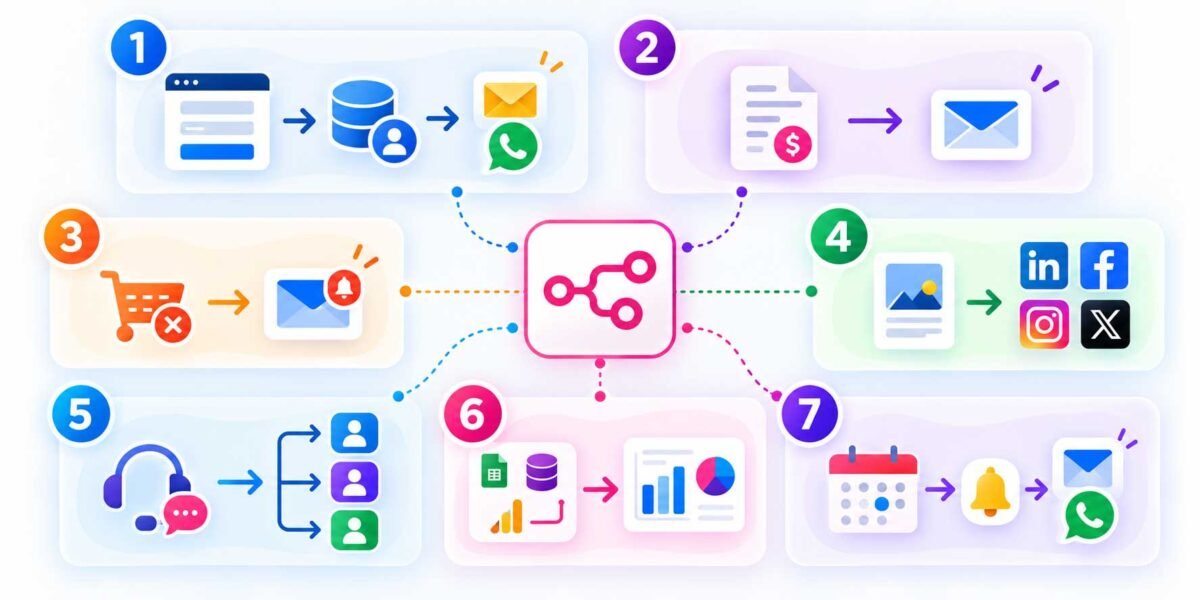
4. Social Media Content Distribution
The problem: You write one piece of content — a blog post, an announcement — and then have to manually go post versions of it on Instagram, LinkedIn, Facebook, and Twitter/X, reformatting each time.
The automation: Publish once (say, in a Google Sheet, Notion, or your blog’s RSS feed), and n8n automatically distributes formatted versions to each platform on a schedule, or immediately if you prefer.
Time saved: 2–3 hours a week for anyone handling their own social presence, and it means you never “forget” to post because you got busy with actual client work.
5. Customer Support Ticket Routing
The problem: Support emails or form submissions come in, and someone has to manually read each one, figure out who should handle it, and forward it along — often causing delays when that person is busy or out.
The automation: n8n reads incoming support requests, uses simple keyword matching (or an AI node for smarter categorization) to sort by topic — billing, technical, general — and routes each one to the right person or team automatically, with a notification so nothing sits unread.
Time saved: 3–4 hours a week, plus faster response times that customers genuinely notice and appreciate.
6. Automated Weekly Reports
The problem: Every week (or month), someone has to log into three or four different tools — analytics, ad platforms, sales dashboards — pull numbers, and manually assemble them into a report for the owner or client.
The automation: n8n connects directly to those platforms’ APIs, pulls the relevant numbers on a schedule, and auto-generates a formatted report — dropped into a Google Doc, sent as a PDF, or posted to Slack — without anyone touching a spreadsheet.
Time saved: 2–4 hours a week depending on how many sources you’re pulling from, and it means reports actually go out on time instead of “sometime this week, I promise.”
7. Appointment Booking and Reminders
The problem: Clients book appointments, but no-shows are a constant drain — and manually sending reminder texts or emails to everyone on the calendar takes real time.
The automation: When someone books through your scheduling tool, n8n automatically sends a confirmation, then follows up with a reminder 24 hours before and again an hour before the appointment — by email, SMS, or WhatsApp, whichever your clients actually respond to.
Time saved: A few hours a week in manual reminders, but the bigger win is the drop in no-shows, which directly protects revenue you’d otherwise lose to empty calendar slots.
Adding It All Up
Here’s the thing about these seven workflows: no single one of them is going to transform your business on its own. But stack three or four of them together — which most small businesses can realistically do — and you’re easily looking at 10+ hours back in your week. That’s not an exaggerated marketing number; that’s just what happens when you stop doing repetitive manual work that a workflow tool can handle in the background, silently, correctly, every single time.
And the honest truth is, these workflows aren’t complicated to build once you know what you’re doing. Most of the seven above use the same handful of building blocks — a trigger, a data lookup, a conditional check, and an action — just rearranged for different purposes. Once you’ve built one, the rest come together fast.
Where to Start If You’re New to This
If you’re just getting started, don’t try to build all seven at once. Pick whichever one solves the problem that annoys you most right now — for most small businesses, that’s either the lead notification workflow or the invoice automation, since both have an immediate, obvious payoff. Get that one running, feel the relief of not doing it manually anymore, and then move on to the next.
Want these built for your business without spending your weekend learning n8n from scratch? Get in touch and I’ll set up the workflows that’ll actually move the needle for how you work — start to finish, tested and ready to go.