

Best WordPress Contact Form Plugins in 2026 (Compared)
A contact form seems like such a small thing until it breaks, and then suddenly it’s the most important piece of your entire website. I’ve had clients call me in a mild panic because their “Get in Touch” form had been silently failing for two weeks — no errors, no warnings, just leads vanishing into thin air while they wondered why business felt slow. That’s the moment people realize their form plugin actually matters.
I’ve installed, configured, and troubleshot pretty much every major WordPress form plugin over the years, across client sites ranging from tiny local business brochures to full e-commerce operations. So let’s skip the fluff and get into which ones are actually worth using in 2026, who each one is really built for, and where each one falls short.
What Actually Matters in a Form Plugin
Before comparing anything, it helps to know what you’re actually judging. When I evaluate a form plugin for a client, I’m looking at:
- Ease of building forms — can a non-technical person do this without me?
- Spam protection — does it actually stop spam, or just slow it down?
- Integrations — does it talk to your email marketing tool, CRM, or payment processor?
- Performance — does it bloat your page load times?
- Price-to-features ratio — are you paying for stuff you’ll never use?
With that lens, here’s how the major players stack up.
1. Fluent Forms
Fluent Forms has quietly become my go-to recommendation for most clients, and it’s the one I run on my own site. The drag-and-drop builder is genuinely fast — noticeably snappier than most competitors, because it’s built lighter from the ground up rather than bolted onto an older codebase. It comes with conditional logic, multi-step forms, and built-in payment integrations even on the lower tiers, which a lot of other plugins lock behind pricier add-ons.
What I like: The free version alone is more capable than most plugins’ paid tiers. Form submissions load fast, the entry management dashboard is clean, and it plays nicely with automation tools like n8n and Zapier out of the box.
Where it falls short: The design/styling options, while solid, aren’t quite as deep as Gravity Forms if you want extremely granular visual control without touching CSS.
Best for: Pretty much everyone — small businesses, freelancers, and growing sites that want power without unnecessary bloat.
2. WPForms
WPForms is the plugin most beginners stumble onto first, and there’s a good reason — its drag-and-drop builder is about as friendly as it gets, with a huge library of pre-built templates that make launching a form feel almost instant. If you’ve never built a form in your life, WPForms holds your hand the whole way through.
What I like: The template library saves genuine time, and their spam protection (via their own honeypot and optional reCAPTCHA/Turnstile integration) is solid without extra configuration.
Where it falls short: Pricing climbs quickly once you need more advanced features like surveys, multi-page forms with conditional logic, or deeper marketing integrations — those live in the higher-priced tiers.
Best for: Total beginners who want the gentlest possible learning curve and don’t mind paying for convenience.
3. Gravity Forms
Gravity Forms is the veteran of this list, and it’s earned a loyal following among developers for a reason — it’s powerful, extendable, and has one of the most mature add-on ecosystems out there. If you need a form that does something genuinely unusual (complex calculations, multi-step wizards, deep third-party integrations), Gravity Forms probably has an add-on for it.
What I like: Rock-solid reliability and flexibility. When a client needs a genuinely complex form — quote calculators, multi-page applications — this is often where I land.
Where it falls short: There’s no free version at all, and the interface feels noticeably dated compared to newer builders. It’s also priced as a premium tool from day one, which is a real barrier for smaller budgets.
Best for: Developers and agencies building complex, custom form logic where budget isn’t the primary concern.
4. Ninja Forms
Ninja Forms sits somewhere in the middle — a capable free version with an add-on marketplace for extending functionality. The builder is clean and reasonably intuitive, and it’s a fine choice if you want something more flexible than WPForms without committing to Gravity Forms’ price tag.
What I like: Generous free tier, and the add-on system means you only pay for what you actually need.
Where it falls short: The a-la-carte add-on pricing can sneak up on you — what starts as “free plugin” can end up costing as much as a bundled competitor once you’ve added a few premium extensions.
Best for: Sites with specific, individual feature needs who’d rather pick add-ons one at a time than buy a bundle.
5. Contact Form 7
The old reliable. Contact Form 7 has been around seemingly forever, it’s completely free, and an enormous number of WordPress sites still run on it. If your needs are genuinely simple — name, email, message, send — it does the job with zero fuss.
What I like: It’s free, lightweight, and there’s no shortage of tutorials and community support if you get stuck.
Where it falls short: The builder is code-based rather than visual (you’re editing shortcode-style tags), which trips up non-technical users. Spam protection isn’t built in — you’ll need to add reCAPTCHA or Akismet yourself. And it lacks the modern conveniences (entry storage, conditional logic, visual styling) that newer plugins offer by default.
Best for: Developers who want a bare-bones, no-frills form and are comfortable with a bit of manual setup.
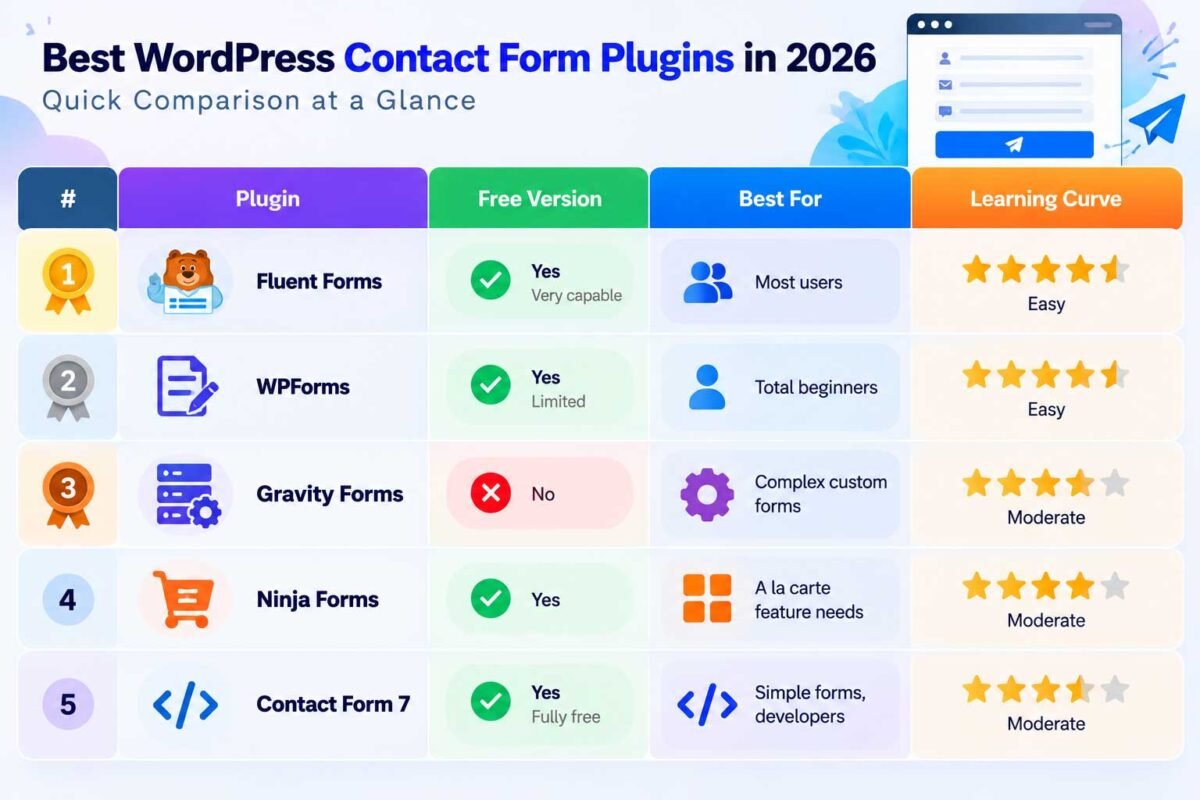
Quick Comparison at a Glance
| Plugin | Free Version | Best For | Learning Curve |
|---|---|---|---|
| Fluent Forms | Yes, very capable | Most users | Low |
| WPForms | Yes, limited | Total beginners | Very low |
| Gravity Forms | No | Complex custom forms | Medium |
| Ninja Forms | Yes | À la carte feature needs | Low–Medium |
| Contact Form 7 | Yes, fully free | Simple forms, developers | Medium (code-based) |
So, Which One Should You Actually Install?
If you want my honest, no-affiliate-link-motivated opinion: Fluent Forms is where I’d point most people reading this in 2026. It hits the best balance of power, speed, and price for the vast majority of business websites — and I say that as someone who runs it myself, not because it’s trendy. If you’re a total beginner who wants extra hand-holding, WPForms is a very close second. And if you’re building something genuinely complex with a real budget behind it, Gravity Forms remains the developer favorite for good reason.
Whatever you pick, don’t stop at “installed” — test your form yourself, submit a real entry, and check that it’s landing where it should. A contact form nobody tests is a contact form that eventually fails silently, and by the time you notice, you’ve already lost leads you’ll never know about.
Not sure which form plugin fits your site, or want it set up with proper spam protection and automation connected to your CRM? Get in touch and I’ll get it built and tested for you properly.