
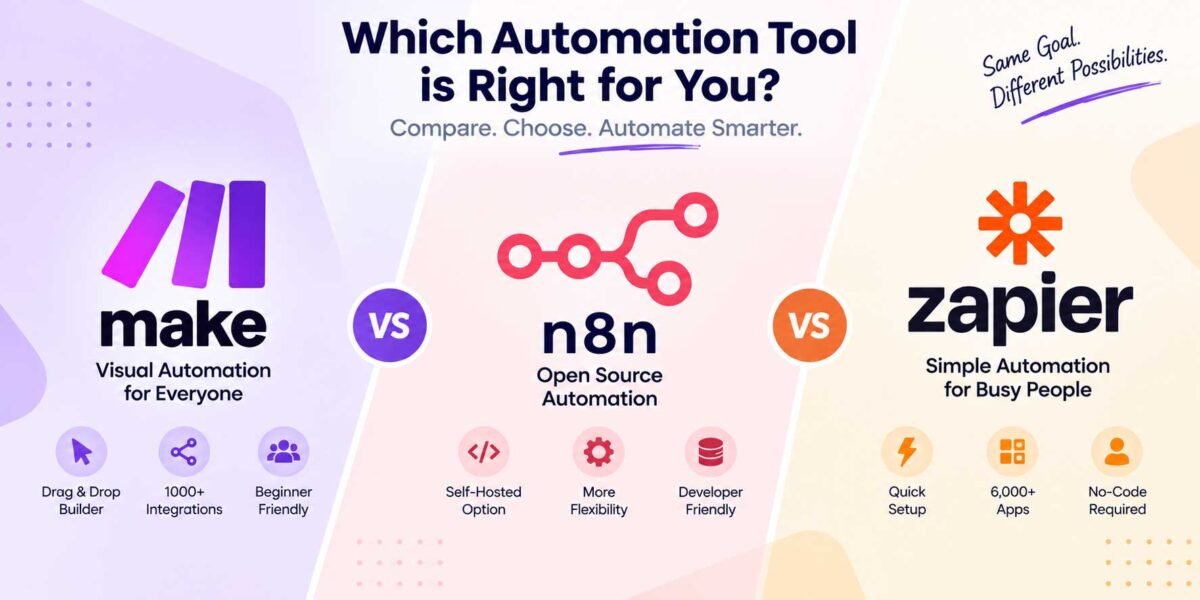
n8n vs Zapier vs Make: Which Automation Tool Should You Choose in 2026?
I get asked this question almost every week now — usually by a client who’s watched one too many “automate your business with AI” reels and wants to know where to start. And honestly, it’s a fair question, because the answer isn’t the same for everyone. I’ve built workflows in all three tools for different clients, and each one has genuinely earned its spot in my toolbox for different reasons.
So instead of giving you the generic “it depends” answer and leaving you to figure out the rest, let me walk you through what actually separates these three, based on real projects — not just marketing pages.
The Quick Answer (If You’re in a Hurry)
- Pick Zapier if you want the simplest possible setup and you’re connecting mainstream apps like Gmail, Slack, and Google Sheets, and you don’t mind paying more as your usage grows.
- Pick Make if you want a visual, flowchart-style builder with more power than Zapier but without needing to write code.
- Pick n8n if you’re comfortable getting a little technical, want full control over your data, or want to self-host to avoid per-task pricing entirely.
Now let’s get into why.
Zapier: The Tool Everyone Starts With
Zapier basically invented this category, and it shows in how polished the experience is. You pick a trigger app, pick an action app, connect the dots, and you’re done in about five minutes. For someone who’s never automated anything before, that ease of use is genuinely valuable — there’s no learning curve to speak of.
Where Zapier starts to show its age is cost and flexibility. Zapier bills you per “task,” and tasks add up fast once you’re running anything beyond a simple one-step automation. I’ve had clients open their Zapier bill and audibly gasp because a workflow they thought was “one automation” was actually burning through hundreds of tasks a day. Multi-step logic, conditional branching, and looping are also more limited compared to what you get with Make or n8n — you can do it, but you’ll hit Zapier’s ceiling faster than you’d expect.
Best for: Solo founders and small teams who want something that “just works” for simple, low-volume automations and don’t want to think about the tool at all.
Make (formerly Integromat): The Visual Power User’s Choice
Make is where I usually point clients who’ve outgrown Zapier but aren’t ready to touch code. The interface is a literal flowchart — you can see your entire automation laid out visually, with branches, routers, and loops mapped out in front of you. Once you get used to it, building genuinely complex automations feels less like configuring a tool and more like sketching out a process on a whiteboard.
The pricing model is also friendlier than Zapier’s for most use cases, since it bills by “operations” rather than full tasks, and operations are cheaper to burn through. The trade-off is that the visual complexity can get overwhelming on bigger workflows — I’ve built Make scenarios with 30+ modules that looked like a subway map, and debugging those takes patience.
Best for: People who want more power and lower cost than Zapier, and don’t mind a steeper (but still visual, no-code) learning curve.
n8n: The Developer-Friendly, Self-Hostable Option
This is the one I’ve come to love the most over the past year, and it’s also the one I’m building my own automation services around. n8n gives you the same visual, node-based builder you’d expect from Make, but with a few things that genuinely change the equation:
- You can self-host it. Run it on your own server, and you’re not paying per task or per operation at all — just your hosting cost. For high-volume workflows, this alone can save serious money.
- You can write actual code when you need to. Drop in a JavaScript or Python node whenever the built-in nodes can’t do exactly what you need. That flexibility is something neither Zapier nor Make really offers.
- You own your data. If you’re working with anything sensitive — client information, financial data, health records — running your automations on your own infrastructure instead of a third party’s cloud is a real advantage, not just a nice-to-have.
The catch is that n8n has a steeper learning curve than Zapier, and self-hosting means you (or someone) needs to handle setup, updates, and occasional troubleshooting. It’s not “no-code” in the purest sense — it’s more like “low-code, with an escape hatch into real code whenever you need it.”
Best for: Businesses with higher automation volume, technical comfort (or a developer/freelancer who can set it up for them), or anyone who wants to avoid ballooning subscription costs as they scale.
Cost: Where the Real Difference Shows Up
This is the part clients care about most, so let’s be blunt about it. Zapier’s pricing scales fastest because you’re charged per task, and tasks multiply quickly in multi-step workflows. Make is more forgiving because operations are cheaper individually, but you can still hit a wall on high-volume automations. n8n’s cloud plan is competitively priced, but the real cost advantage shows up when you self-host — at that point, your “subscription” becomes whatever a small VPS costs you per month, and your usage can scale far beyond what you’d pay Zapier or Make for equivalent volume.
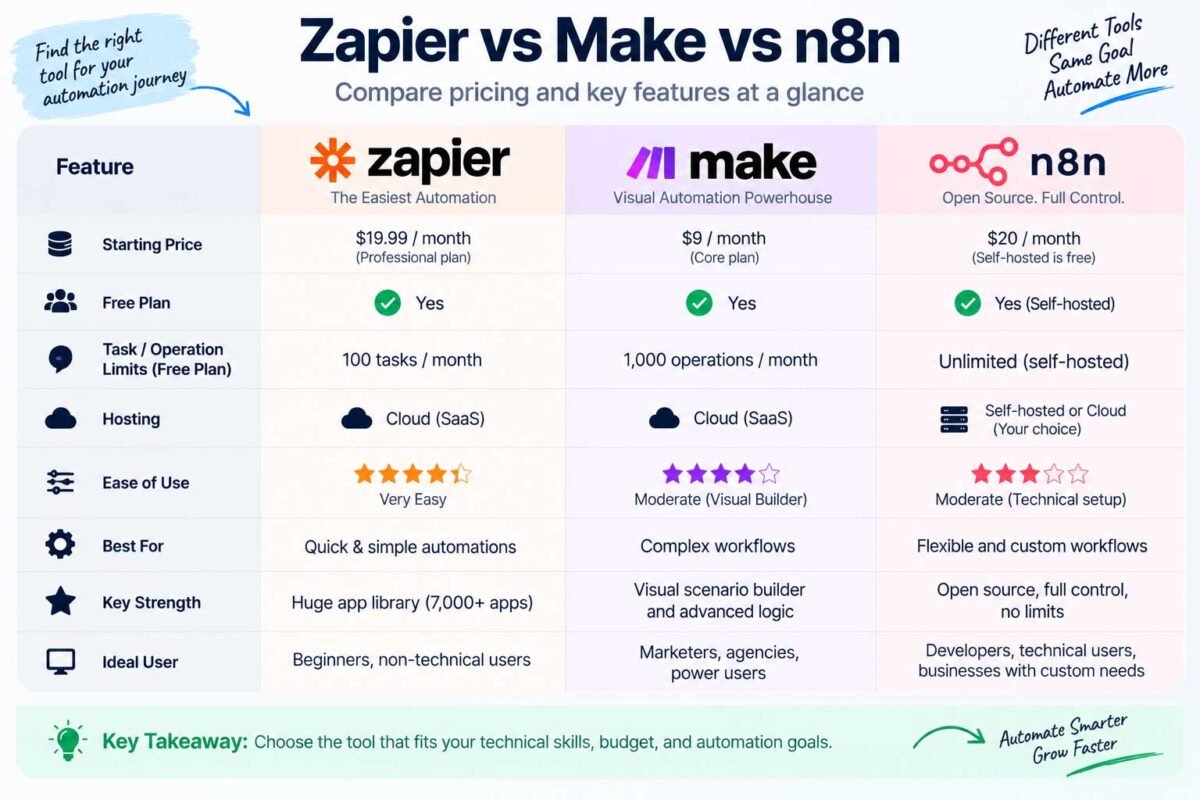
I’m not going to throw specific dollar figures at you here because all three platforms update their pricing tiers often enough that anything I write today could be outdated by the time you read it. Check each platform’s current pricing page before deciding — but know that the shape of the cost curve is what I described above, and that pattern has held steady for years.
So, Which One Should You Actually Pick?
If I’m being honest with you the way I’d be honest with a client sitting across from me: start with what matches your comfort level and your volume, not what’s trendiest.
- If you’re automating a handful of simple things and want zero friction, Zapier will serve you well.
- If you want more control, more complex logic, and better pricing without touching code, Make is the sweet spot.
- If you’re scaling fast, working with sensitive data, or just want a tool that grows with you instead of taxing you for growing, n8n is where I’d put my money — and where I’ve put my own business.
You don’t have to marry one tool forever, either. I know plenty of businesses that started on Zapier, hit its limits, and migrated to Make or n8n once their needs got more serious. That’s a perfectly normal path, not a failure.
Not sure which one fits your specific workflow, or want someone to just build it for you? Get in touch and I’ll help you figure out the right tool — and set it up — so you’re not the one stuck troubleshooting it at midnight.