
How to Recover Abandoned Carts in WooCommerce (With Automation)
If you run a WooCommerce store, here’s a number that probably won’t surprise you but will still sting a little: most stores lose 60-70% of carts before checkout completes. Someone adds a product, gets distracted, hesitates on shipping cost, or just closes the tab to “buy it later” — and later never comes.
I build automation workflows for WooCommerce stores for a living, and abandoned cart recovery is one of the first things I set up for almost every client, because it’s one of the few automations that pays for itself in the first week. Here’s exactly how I set it up, and how you can recover carts in WooCommerce using automation instead of just hoping people come back on their own.
Why Manual Cart Recovery Doesn’t Work
Some store owners try to handle this manually — checking WooCommerce orders daily, spotting the “pending” or abandoned ones, and emailing customers themselves. It technically works, but it doesn’t scale, and speed is everything here. A recovery email sent within the first hour converts far better than one sent a day later, and nobody’s sitting at their desk refreshing the orders page every hour.
This is exactly the kind of repetitive, time-sensitive task automation was built for.
How Abandoned Cart Recovery Automation Actually Works
The system I build for clients follows this logic:
- Detect the abandoned cart — A webhook fires the moment a customer starts checkout but the order isn’t completed within a set time window (usually 30-60 minutes).
- Re-check the order status — Before sending anything, the workflow rechecks WooCommerce to confirm the order genuinely wasn’t completed (this avoids the embarrassing mistake of emailing someone who already paid).
- Send a personalized first email — Not a generic “you left something in your cart” template, but a message referencing the actual product, with a friendly, human tone.
- Wait, then send a second email with an incentive — If the first email doesn’t convert within 24 hours, a second message goes out with a real, auto-generated discount coupon to nudge the decision.
- Log everything — Every recovered cart, coupon issued, and customer response gets logged to a spreadsheet automatically, so you can track how well it’s actually working.

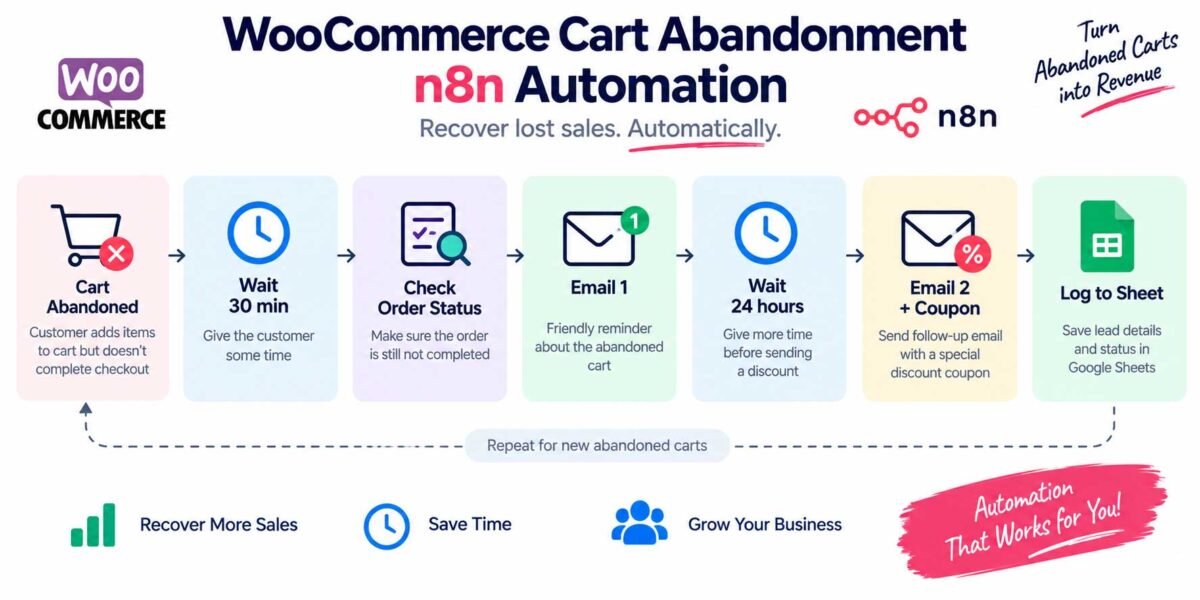
This is a two-stage sequence, not a single blast email — and that’s what makes the difference. Most stores that lose sales here send one flat reminder and stop, missing the segment of customers who just needed a small incentive to come back.
Tools You Need to Set This Up
You don’t need custom-built software for this. The stack I use is:
- WooCommerce — your store, obviously, with order webhooks enabled
- n8n — the automation platform that listens for the abandoned cart trigger, waits, checks status, and sends the sequence
- Email service (Gmail/SMTP or a transactional email provider) — to send the recovery emails
- Google Sheets — for logging recovered carts and coupon usage, so you have visibility without needing to check a dashboard
The advantage of building this with n8n instead of a plugin is flexibility — plugins usually lock you into their own email templates and timing rules, while a custom workflow lets you control exactly when emails go out, what they say, and how coupons are generated and tracked.
A Note on Coupon Security
If you’re generating discount codes automatically, don’t use simple sequential codes like SAVE10-001, SAVE10-002. These are easy to guess and can be abused by people cycling through numbers to find a valid one. Always append a random string to each generated code so it can’t be predicted.
Setting Realistic Expectations
Abandoned cart automation won’t recover every lost sale — some people genuinely weren’t going to buy. But even a modest 10-15% recovery rate on carts that would have otherwise been lost is pure upside, since the infrastructure runs on autopilot once it’s built.
Final Thoughts
If your WooCommerce store doesn’t have an abandoned cart recovery system running yet, it’s one of the highest-return automations you can add — it runs quietly in the background, requires no daily attention once it’s set up, and directly recovers revenue you’re currently losing without realizing it.
Want this set up on your store without building it yourself? Get in touch and I’ll build and test the full workflow for you.